PIXNET Logo登入

小攻城師的戰場筆記

跳到主文

我是每天都和程式語言奮戰的小攻城師,在此記錄日常遇到的問題與解答。

部落格全站分類:數位生活

  • 相簿
  • 部落格
  • 留言
  • 名片
  • 5月 26 週三 202114:52
  • [SVN] 匯出TortoiseSVN的commit log

想把 commit log 匯出來做專案管理、上線記錄等,上網查了一下可以這樣做:
svn log --xml > repository.xml
(繼續閱讀...)
文章標籤

小攻城師 發表在 痞客邦 留言(0) 人氣(915)

  • 個人分類:Version Control
▲top
  • 4月 27 週二 202111:07
  • [Mercurial] 解決hg pull遇到error code 255的問題

向來都做得很順利的 hg pull,昨天在 TortoiseHg 一直出現 error code 255,做到一半就中斷,會出現「cmdserver: 程序意外結束,代碼 255」。如果看詳細的錯誤訊息,裡面還有個錯誤是 "zstd.ZstdError: zstd decompressor error: Corrupted block detected"。
看不懂發生什麼事、也不知道要怎麼處理,本來想說沒辦法直接透過網路做 hg pull,想要叫對方包成包裹 (bundles) 寄給我,但在對方執行 hg bundle 時,她電腦上會出現另一款錯誤訊息:「abort: empty or missing file data for '某個檔案路徑.docx'」。
(繼續閱讀...)
文章標籤

小攻城師 發表在 痞客邦 留言(0) 人氣(340)

  • 個人分類:Version Control
▲top
  • 11月 24 週五 201709:27
  • [Mercurial] 解除TortoiseHg commit時卡住的狀態

這天要用 TortoiseHg commit 時,GUI 介面卡住好久。改下 commit:
> hg commit -I myfile.txt -m "To do something"
(繼續閱讀...)
文章標籤

小攻城師 發表在 痞客邦 留言(0) 人氣(251)

  • 個人分類:Version Control
▲top
  • 11月 15 週三 201715:40
  • [Mercurial] 修復TortoiseHg 4.3.1無法使用exportfiles套件的bug

在登錄編輯器(regedit)修改機碼目錄名稱
幫新人設定 TortoiseHg,結果要加入擴充套件 "exportfiles" 時(設定請參考:[Mercurial] 讓 TortoiseHg 能夠匯出指定版本之間的差異檔案),卻顯示錯誤訊息:
*** 匯入額外套件 exportfiles 失敗,路徑為 D:\Programs\TortoiseHg\extensions\exportfiles.py: missing attributes: norepo, optionalrepo, inferrepo
*** (use @command decorator to register 'exportfiles')
hg: 不認得'exportfiles'命令
(did you mean one of export, files?)
(繼續閱讀...)
文章標籤

小攻城師 發表在 痞客邦 留言(0) 人氣(151)

  • 個人分類:Version Control
▲top
  • 11月 30 週三 201614:22
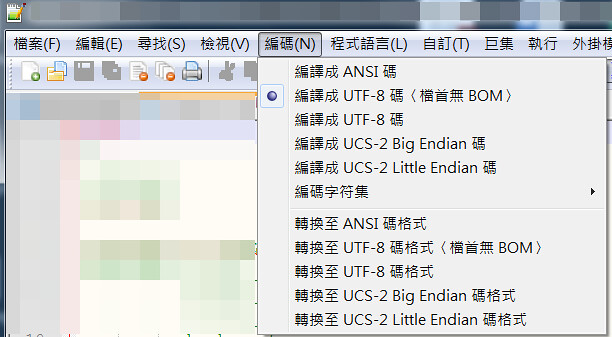
  • [VCS] Perforce設定UTF-8為檔首無BOM

檔案是UTF-8(無BOM)
某專案要上傳到 Perforce 做版本控制,不過今天上線人員反映,我提供給他的程式清單、和他從 Perforce 匯出的檔案,有幾個檔案和我的大小不一致,不一致的檔案都足足差了 3 Bytes。
我的檔案列表是,用 C# 的 FileInfo 去取得 Length 後,輸出成上線人員想要的紙本表單:
(繼續閱讀...)
文章標籤

小攻城師 發表在 痞客邦 留言(0) 人氣(544)

  • 個人分類:Version Control
▲top
  • 7月 13 週一 201509:19
  • [Mercurial] TortoiseHg在取資料時出現[Errno 11004] getaddrinfo failed

TortoiseHg Web Server
同事開了空資料夾,想要 clone 我這邊的專案,可是出現以下錯誤訊息:
[Errno 11004] getaddrinfo failed
後來發現是來源路徑 (source) 多了一個點 (.),改掉就好了,哈哈。原來是這個錯誤訊息指路徑不正確的意思啊。
 
(繼續閱讀...)
文章標籤

小攻城師 發表在 痞客邦 留言(0) 人氣(312)

  • 個人分類:Version Control
▲top
  • 12月 04 週四 201415:17
  • [Mercurial] 修復TortoiseHg新版無法使用exportfiles套件的bug

把 Tortoise Hg 升級到 3.2.1 版(原本是 2.x),之前慣用的 exportfiles 套件就突然不能用了,錯誤訊息如下。
** Unknown exception encountered with possibly-broken third-party extension exportfiles
** which supports versions 2.2.2 of Mercurial.
** Please disable exportfiles and try your action again.
** If that fixes the bug please report it to https://bitbucket.org/albert_brand/
hgexportfiles/issues
** Python 2.7.6 (default, Nov 10 2013, 19:24:18) [MSC v.1500 32 bit (Intel)]
** Mercurial Distributed SCM (version 3.2.1)
** 載入額外套件: exportfiles, extdiff, win32text
Traceback (most recent call last):
  File "hg", line 42, in <module>
  File "mercurial\dispatch.pyo", line 28, in run
  File "mercurial\dispatch.pyo", line 71, in dispatch
  File "mercurial\dispatch.pyo", line 140, in _runcatch
  File "mercurial\dispatch.pyo", line 850, in _dispatch
  File "mercurial\dispatch.pyo", line 611, in runcommand
  File "mercurial\dispatch.pyo", line 941, in _runcommand
  File "mercurial\dispatch.pyo", line 912, in checkargs
  File "mercurial\dispatch.pyo", line 847, in <lambda>
  File "mercurial\util.pyo", line 677, in check
  File "C:/TortoiseHg/extensions/exportfiles.py", line 81, in exportfiles
    first = rng[0]
TypeError: 'baseset' object does not support indexing
(繼續閱讀...)
文章標籤

小攻城師 發表在 痞客邦 留言(1) 人氣(126)

  • 個人分類:Version Control
▲top
  • 3月 09 週六 201317:32
  • [Mercurial] hg 的指令語法 (command line)

用了 TortoiseHg 好一陣子,大部分時候相安無事,但偶爾它也會鬧鬧脾氣。
像是今天要提交 (commit) 修改成果時,GUI 視窗就一直顯示停止運作,
我猜應該是因為要列出新舊檔案差異時發生了什麼錯誤吧?
總之就開了 command line 來處理這個問題。
(繼續閱讀...)
文章標籤

小攻城師 發表在 痞客邦 留言(0) 人氣(827)

  • 個人分類:Version Control
▲top
  • 2月 13 週一 201222:00
  • [Mercurial] 把 Tortoisehg 的 Diff 工具改成 VIM

因為預設的 kdiff 看中文很奇怪,要嘛是亂碼、要嘛是字疊在一起,所以決定還是來把 diff tool 換成 VIM 好了。今天就參考了 "Vim with VCS(Version Control System)" 這篇來做調整。
透過右鍵選單→TortoiseHg→Global Settings→編輯檔案,開啟設定檔。然後把以下的設定值加進去。
(繼續閱讀...)
文章標籤

小攻城師 發表在 痞客邦 留言(0) 人氣(405)

  • 個人分類:Version Control
▲top
  • 11月 13 週日 201118:04
  • [Mercurial] 讓 TortoiseHg 能夠匯出指定版本之間的差異檔案

讓 TortoiseHg 能夠匯出指定版本之間的差異檔案 (1)
TortoiseSVN 有個我非常喜歡的功能:可以匯出指定的兩個版本之間的差異檔案。比方說我從第三版到第十版只修改了 abc.html,那麼它就只會匯出這支檔案。這個功能在 TortoiseSVN 的詳細用法可以參考保哥寫的《如何讓 TortoiseSVN 僅匯出新增或修改過的檔案 》。
但是,在 TortoieHg 好像只能匯出「最新版本與前一版之間的差異檔案」,我在它本身的功能裡找不到 TortoiseSVN 的這項功能哩。用了 TortoiseHg 一陣子,一直覺得這點非常困擾我。最近透過搜尋找到這篇文章:"TortoiseHg - How to export changed files",作者寫了一個擴充套件,有了這個套件就能輕鬆取出指定的檔案來。
安裝步驟很簡單:
1. 取得 exportfiles.py。
我是透過 TortoiseHg 的 Clone 設定來源為 "https://bitbucket.org/albert_brand/hgexportfiles"、目的為我本機的任意資料夾,取得這支檔案。
你也可以點選 downloads 頁籤,直接從網頁上下載檔案。(我後來下載了 tip 的 zip 格式檔案,解壓縮後,其中的 exportfiles.py 內容和我透過 Clone 取得的內容無異)
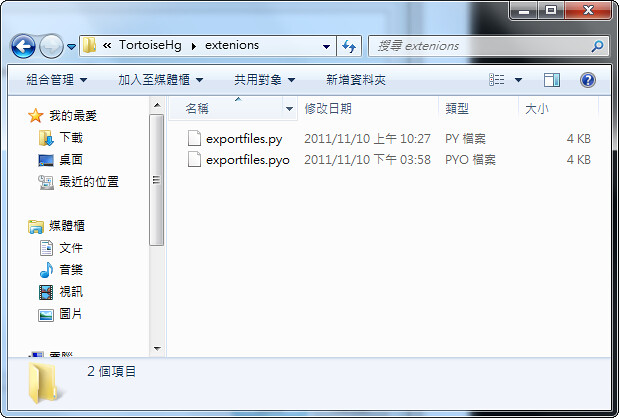
2. 把 exportfiles.py 放在正確的位置。找出你的 TortoiseHg 安裝路徑,在裡面開一個 extensions 的資料夾,把檔案放進去。完整的路徑可能是 "c:\Program Files\TortoiseHg\extensions\exportfiles.py",實際路徑視你的 TortoiseHg 安裝路徑而定。
3. 在全域設定 (global settings) 將這個擴充套件設定起來。
(繼續閱讀...)
文章標籤

小攻城師 發表在 痞客邦 留言(0) 人氣(994)

  • 個人分類:Version Control
▲top
12»

內文搜尋

最近看了什麼呢

  • [Web] 在JC (Java Composer)設定多個header
  • [Windows] CURL出現「CRYPT_E_REVOCATION_OFFLINE (0x80092013) - 因為撤銷伺服器已離線,無法完成撤銷檢查」
  • [Windows] 使用IIS Crypto小心影響遠端桌面連線(RDP)運作
  • [Windows/macOS] 使用ffmpeg壓縮影片檔案
  • [PowerShell] 連線到SQL Server確認資料連線
  • [MOSS] 排除SharePoint搜尋功能無法使用問題
  • [Web] SSH Terrapin Prefix Truncation Weakness
  • [MSSQL] 處理時戳日期轉換時少一天的問題
  • [Web] Google Ad Manager無法刊登廣告問題排除
  • [Web] Cyberbit Range筆記

筆記分類成這些

toggle 文書處理 (5)
  • VIM (5)
  • LaTeX (8)
  • Excel (9)
  • PowerPoint (3)
  • Word (5)
toggle 前端技術 (4)
  • Browser (5)
  • HTML/CSS/JavaScript (39)
  • jQuery (9)
  • ExtJS (3)
toggle 後端技術 (8)
  • Sybase (1)
  • Oracle (1)
  • Java (2)
  • ASP.NET (14)
  • Python (9)
  • PHP (36)
  • MSSQL (9)
  • MySQL (7)
toggle 系統相關 (5)
  • iOS/Android (8)
  • IIS (5)
  • Apache (8)
  • Linux (7)
  • Windows (39)
toggle 其他內容 (9)
  • 施博瀚的以拉拉拉 (5)
  • SharePoint (6)
  • 網站設定 (9)
  • 使用其他網站的小筆記 (4)
  • 原文轉載 (1)
  • Version Control (16)
  • Conference (5)
  • Security (4)
  • 雜七雜八 (37)
  • 未分類文章 (1)

文章彙整

參觀人氣

  • 本日人氣:
  • 累積人氣:

大家通常讀這些

  • (245,999)[Win] 移除「永遠用選取的程式來開啟這種檔案」設定。
  • (4,297)[Windows] Win10安裝字型檔時出現「不是有效的字型檔」
  • (33,081)[Windows]修改ASUS BIOS顯示卡設定
  • (113,026)[Office] 在 Word 2010 設定「合併儲存格」的快速鍵
  • (24,589)[Misc.] 在 Apple Store 買東西時打統編(為發票加上統一編號)
  • (24,689)[Misc.] 郵局掛號郵件的改投改寄
  • (19,241)[Office] 讓Outlook像GMail一樣,群組郵件對話(顯示為交談)
  • (25,397)[Misc.] 東西掉到後面時取出 IKEA ALEX 抽屜櫃的抽屜
  • (28,687)[Office] 解決Powerpoint另存PDF失敗的問題
  • (31,148)[Windows] 查詢AD網域使用者帳號密碼到期日


里程碑