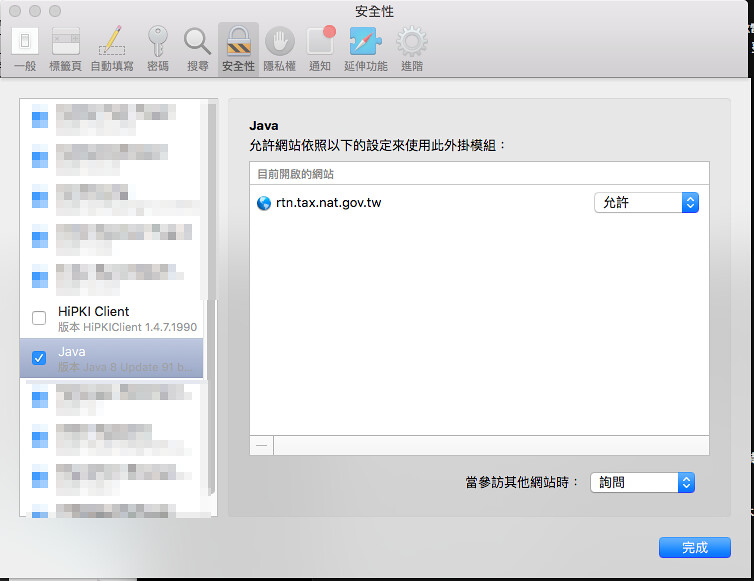
每年申報所得稅都會很懷疑自己為什麼不花點錢買一台 Windows 的電腦⋯⋯今年也不例外。一進入線上申報的頁面,先是說我的 Java 版本太舊了叫我重新下載。下載完畢後,輸入了身分證字號和 PIN 碼,準備要看今年的所得資料,卻告訴我憑證驗證錯誤。錯誤訊息是「無法載入IC卡函式庫檔案-函式失敗6」。
好險 Google 錯誤訊息就找到這篇:《[分享文] Mac 報稅錯誤排除 「無法載入IC卡函式庫檔案:函式失敗(6)」》,我和他的環境一樣,都是 OS/X 10.11.4 版、Safari 9.1 版。
小攻城師 發表在 痞客邦 留言(4) 人氣(4,467)
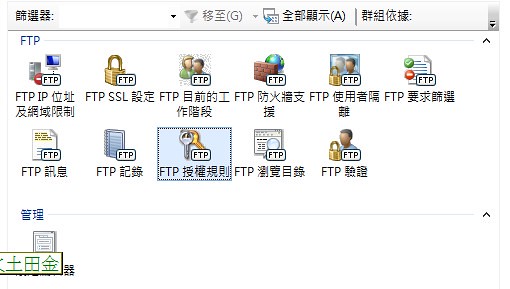
今天要轉置一台 IIS 主機,架個 FTP 在上面,因為前一代就是在 IIS 上架 FTP,所以想說就照舊,沒有改用 FileZilla FTP Server。
參考 "Configuring FTP User Isolation in IIS 7" 做了設定,在使用者管理也開了帳號,但仍無法登入。
小攻城師 發表在 痞客邦 留言(0) 人氣(4,247)
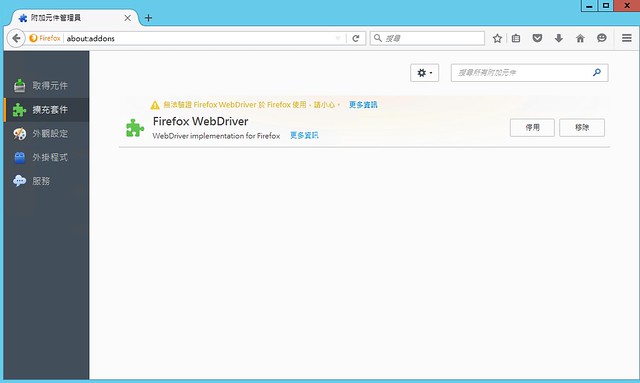
同事寫了支 Java 程式會用到 Firefox 抓網站的螢幕擷圖,不過今天執行起來怪怪的,我仔細想一下,好像是我把 Firefox 更新後發生的問題?看了一下錯誤訊息,裡面有這一段內容:
org.openqa.selenium.firefox.NotConnectedException: Unable to connect to host 127.0.0.1 on port 7055 after 45000 ms. Firefox console output:
hello\AppData\Local\Temp\anonymous1263966490208696868webdriver-profile\extensions\fxdriver@googlecode.com
1461490691668 addons.xpi DEBUG Ignoring file entry whose name is not a valid add-on ID: C:\Users\hello\AppData\Local\Temp\anonymous1263966490208696868webdriver-profile\extensions\webdriver-staging
1461490691668 addons.xpi INFO SystemAddonInstallLocation directory ismissing
1461490691669 addons.xpi INFO Mapping {972ce4c6-7e08-4474-a285-3208198ce6fd} to C:\Program Files (x86)\Mozilla Firefox\browser\extensions\{972ce4c6-7e
08-4474-a285-3208198ce6fd}
1461490691670 addons.xpi DEBUG Skipping unavailable install location app-system-share
小攻城師 發表在 痞客邦 留言(0) 人氣(470)
今天遇到一個在 Load balancer 上的網站,採用 PHP 5 的 A 主機網頁正常,但使用 PHP 7 的 B 主機版面就怪怪的。追蹤了一下,看起來是 fgetcsv() 出問題,沒有正常解析。我們的 CSV 檔是 Big5 編碼的,看起來是解析了某個中文欄位之後,後續欄位就有異常。
上網查了一下,找到《PHP讀取BIG5編碼的CSV檔》,裡面提到:
小攻城師 發表在 痞客邦 留言(2) 人氣(889)
今天遇到一個新機器,把舊機器上的 Apache config (httpd.conf) 和程式直接丟上去,卻跑出錯誤訊息:
403 Forbidden
You don't have any permission on ... (路徑名稱)
小攻城師 發表在 痞客邦 留言(0) 人氣(4,973)
今天發現一支原本跑得好好的程式出現錯誤:
javax.net.ssl.SSLHandshakeException: sun.security.validator.ValidatorException: PKIX path building failed: sun.security.provider.certpath.SunCertPathBuilderException: unable to find valid certification path to requested target
at com.sun.net.ssl.internal.ssl.Alerts.getSSLException(Alerts.java:174)
at com.sun.net.ssl.internal.ssl.SSLSocketImpl.fatal(SSLSocketImpl.java:1747)
at com.sun.net.ssl.internal.ssl.Handshaker.fatalSE(Handshaker.java:241)
at com.sun.net.ssl.internal.ssl.Handshaker.fatalSE(Handshaker.java:235)
at com.sun.net.ssl.internal.ssl.ClientHandshaker.serverCertificate(ClientHandshaker.java:1209)
at com.sun.net.ssl.internal.ssl.ClientHandshaker.processMessage(ClientHandshaker.java:135)
at com.sun.net.ssl.internal.ssl.Handshaker.processLoop(Handshaker.java:593)
at com.sun.net.ssl.internal.ssl.Handshaker.process_record(Handshaker.java:529)
at com.sun.net.ssl.internal.ssl.SSLSocketImpl.readRecord(SSLSocketImpl.java:943)
at com.sun.net.ssl.internal.ssl.SSLSocketImpl.performInitialHandshake(SSLSocketImpl.java:1188)
at com.sun.net.ssl.internal.ssl.SSLSocketImpl.startHandshake(SSLSocketImpl.java:1215)
at com.sun.net.ssl.internal.ssl.SSLSocketImpl.startHandshake(SSLSocketImpl.java:1199)
at org.apache.http.conn.ssl.SSLConnectionSocketFactory.createLayeredSocket(SSLConnectionSocketFactory.java:275)
at org.apache.http.conn.ssl.SSLConnectionSocketFactory.connectSocket(SSLConnectionSocketFactory.java:254)
at org.apache.http.impl.conn.HttpClientConnectionOperator.connect(HttpClientConnectionOperator.java:123)
at org.apache.http.impl.conn.PoolingHttpClientConnectionManager.connect(PoolingHttpClientConnectionManager.java:318)
at org.apache.http.impl.execchain.MainClientExec.establishRoute(MainClientExec.java:363)
at org.apache.http.impl.execchain.MainClientExec.execute(MainClientExec.java:219)
at org.apache.http.impl.execchain.ProtocolExec.execute(ProtocolExec.java:195)
at org.apache.http.impl.execchain.RetryExec.execute(RetryExec.java:86)
at org.apache.http.impl.execchain.RedirectExec.execute(RedirectExec.java:108)
at org.apache.http.impl.client.InternalHttpClient.doExecute(InternalHttpClient.java:184)
at org.apache.http.impl.client.CloseableHttpClient.execute(CloseableHttpClient.java:82)
at org.apache.http.impl.client.CloseableHttpClient.execute(CloseableHttpClient.java:106)
at org.test.myProgram.run(myProgram.java:127)
at org.test.myProgram.main(myProgram.java:49)
Caused by: sun.security.validator.ValidatorException: PKIX path building failed: sun.security.provider.certpath.SunCertPathBuilderException: unable to find valid certification path to requested target
at sun.security.validator.PKIXValidator.doBuild(PKIXValidator.java:323)
at sun.security.validator.PKIXValidator.engineValidate(PKIXValidator.java:217)
at sun.security.validator.Validator.validate(Validator.java:218)
at com.sun.net.ssl.internal.ssl.X509TrustManagerImpl.validate(X509TrustManagerImpl.java:126)
at com.sun.net.ssl.internal.ssl.X509TrustManagerImpl.checkServerTrusted(X509TrustManagerImpl.java:209)
at com.sun.net.ssl.internal.ssl.X509TrustManagerImpl.checkServerTrusted(X509TrustManagerImpl.java:249)
at com.sun.net.ssl.internal.ssl.ClientHandshaker.serverCertificate(ClientHandshaker.java:1188)
... 21 more
Caused by: sun.security.provider.certpath.SunCertPathBuilderException: unable to find valid certification path to requested target
at sun.security.provider.certpath.SunCertPathBuilder.engineBuild(SunCertPathBuilder.java:174)
at java.security.cert.CertPathBuilder.build(CertPathBuilder.java:238)
at sun.security.validator.PKIXValidator.doBuild(PKIXValidator.java:318)
... 27 more
javax.net.ssl.SSLHandshakeException: sun.security.validator.ValidatorException: PKIX path building failed: sun.security.provider.certpath.SunCertPathBuilderException: unable to find valid certification path to requested target
小攻城師 發表在 痞客邦 留言(2) 人氣(14,227)
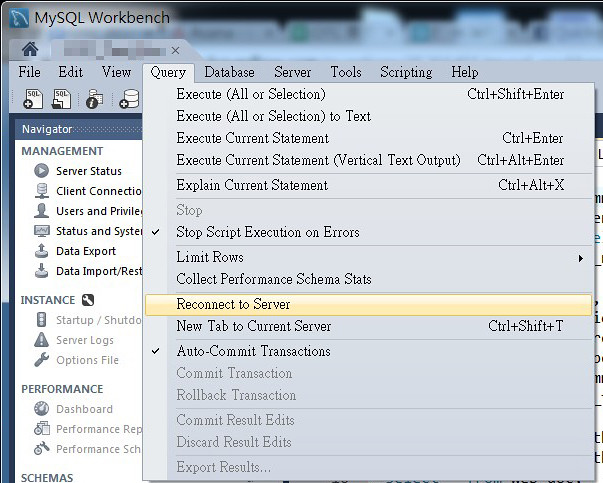
有時候因為種種原因 MySQL 會停掉重啟,這時候原本正在使用中的 MySQL Workbench 就會斷線,以前都是把分頁關掉重開,後來想想應該有更聰明的做法才對。
官方文件好長懶得看完XD,在 stackoverflow 找到 "MySQL Workbench: Reconnecting to database when “MySQL server has gone away”?":在選單上的 "Query" (查詢)→ "Reconnect to Server"(連線到伺服器),點一下就可以重新連線到 MySQL 了。
小攻城師 發表在 痞客邦 留言(0) 人氣(1,529)
公司辦了一個活動,吸引了大批網友來留言,因為合作廠商說只能幫忙分析 (parse) 公開留言,所以得手動把 facebook 誤判為廣告 (spam) 而隱藏的留言 (comments) 打開。
想要人工檢閱,但是點一次只展開其中的 50 筆,所以上網 Google "facebook expand all comments",找到這篇:"Expand All Facebook Comments"。
小攻城師 發表在 痞客邦 留言(10) 人氣(8,750)
手上有一個網站,大部分的網頁語系都是宣告為 UTF-8,只有某個資料夾裡的網頁比較特別,都宣告為 Big5。今天看到測試的 server 裡, 宣告成 Big5 的那個資料夾的每一支網頁都變成以 UTF-8 模式載入,以至於使用者在不手動切換編碼的狀況下會看到一堆亂碼。
研究了一下原始碼,META 裡有宣告 Big5 沒錯。
小攻城師 發表在 痞客邦 留言(0) 人氣(608)
今天在 MacBook Pro 上要安裝雙作業系統,安裝好 Parallels for Mac 11 後,把 Windows 10 的 USB 隨身碟插到 MacBook 上,一開始是先一直跳進 Shell Script 視窗,因為訊息裡有 EFI,所以就在 Parallels 的 設定 → 硬體 → 啟動順序 → 把「使用 EFI 引導」的勾選拿掉。
拿掉後看起來有進正常的 Windows 作業系統安裝畫面,會問要安裝 64 bits 或 32 bits 的 Windows 10,我們選了 64 bits。進入 GUI 的安裝畫面後,先是花了一點時間複製、安裝 Windows 10 作業系統,安裝完成後會問要不要重新啟動,或是在數秒後自動重啟。
小攻城師 發表在 痞客邦 留言(0) 人氣(1,523)
 文書處理 (5)